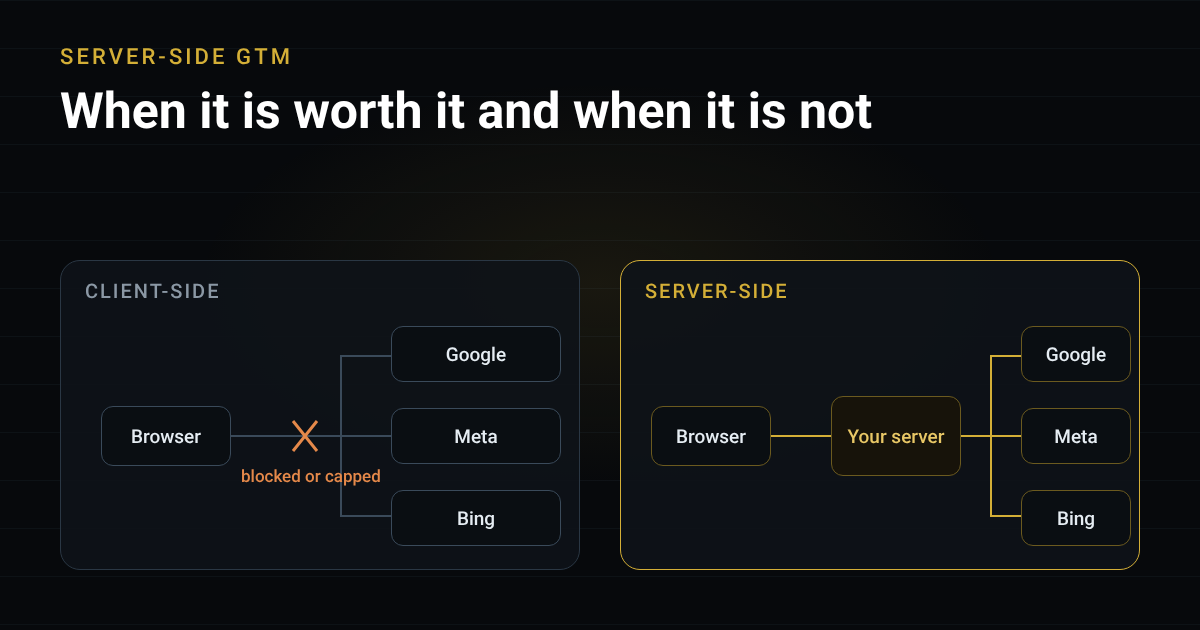
Every few months a client asks me the same thing: “Should we move to server-side GTM?” My honest answer is often “not yet”. Server-side tagging solves real problems, but it also adds a server you have to pay for, monitor and maintain.
This article explains what client-side tagging loses, what server-side changes, what it costs, and the cheaper option that many teams should try first.
What client-side GTM does, and where it leaks
With a normal web container, Google Tag Manager loads in the visitor’s browser. Every tag then sends its data straight from that browser to a third party: Google Analytics, Google Ads, Meta, Microsoft and so on. That is how you measure traffic and conversions.
It works, but the data can leak out in three places.
- Ad blockers and privacy browsers. They block the tag scripts and the requests to known tracking domains. This is bigger than cookies: when the request is blocked, the visit or the conversion never reaches the platform at all.
- Safari’s Intelligent Tracking Prevention (ITP). Cookies written by JavaScript are capped at 7 days. When a visitor arrives through a link carrying a click ID such as
gclid, from a domain Safari classifies as tracking, the cap can drop to 24 hours. A person who clicks an ad today and buys nine days later can look like a brand new visitor, so the sale is credited to direct traffic or lost. - Several platforms, several copies. Each platform collects its own version of the event from the browser. When they disagree, you have no single place to check or correct the data.
If you spend a lot on ads, these gaps cost real money, because the platforms optimise on the conversions they can see.
What server-side GTM changes
With server-side GTM, the browser sends one request to your own subdomain, for example data.yourdomain.com. A server container receives it and forwards the data to each platform.
| Client-side | Server-side | |
|---|---|---|
| Where tags run | In the visitor’s browser | On a server you control |
| Request goes to | Many third-party domains | Your own domain first |
| Cookies | Mostly set by JavaScript | Can be set by your server |
| Control over data | Each tag sends what it wants | You filter and shape data in one place |
| Page weight | Many scripts in the browser | Fewer scripts in the browser |
The practical benefits are:
- Better data recovery. A first-party endpoint is harder for simple blockers to catch, and cookies set by your server can last longer.
- Control and governance. You can remove or hash fields before they leave your infrastructure and decide exactly which platform receives what.
- Conversion APIs. Sending events server to server, for example Meta’s Conversions API or Google Ads enhanced conversions, improves matching and attribution.
- Lighter pages. Fewer third-party scripts run in the browser.
Two caveats matter. First, Safari can still cap cookies set by a server in some setups, for example when the server’s IP address does not sufficiently match your website’s IP address, so the hosting design needs care. Second, server-side does not bypass consent. Your banner and your consent rules apply exactly as before.
What it costs
- Hosting. You pay for the server, either on a cloud platform or through a managed provider. The bill grows with traffic, and production setups usually need more than one instance. Check current pricing before you decide.
- Setup time. The container, the custom domain, the tag migration and the testing take far longer than a web container.
- Upkeep. Someone must monitor it, update it and fix it. If the server fails, your data stops.
- Complexity. Debugging now spans the browser, the server container and each vendor.
When it is worth it
In my view, server-side GTM is worth it when most of these are true:
- You spend a lot on advertising, across more than one platform.
- You need attribution that is as close to accurate as possible, because budget decisions depend on it.
- You have a real need to control what data is sent and to whom.
- You have someone who will own it after launch.
It is usually not worth it when:
- Your ad spend is small, or you only run Google Ads.
- Nobody on the team can maintain a server.
- You hope it will let you track people who declined consent. It will not.
The cheaper option: Google tag gateway
If you only advertise on Google Ads, look at Google tag gateway first. It serves your Google tags and forwards their measurement requests through your own domain. Cloudflare supports it as a built-in option, free of charge, and set up is a few clicks. Read the Cloudflare documentation for Google tag gateway to see the steps.
Know its limits. It covers Google tags only, so it does nothing for Meta or Bing. It is not a server container, so you cannot filter or transform data, and it does not send events to other platforms.
| Your situation | What I would do |
|---|---|
| Small spend, Google Ads only | Web container plus Google tag gateway |
| Moderate spend, several platforms | Start with tag gateway, then test one server-side connection |
| Large spend, several platforms, strict data rules | Server-side GTM with a first-party subdomain |
| Any size, no owner for the setup | Keep it client-side and keep it clean |
A short checklist before you commit
- Measure the gap. Compare conversions in your ad platforms with your CRM or backend sales. Check how much of your traffic comes from Safari.
- Try tag gateway first if you are on Cloudflare and rely on Google.
- Pick one use case. For example, send Meta conversions server to server and validate the result against the CRM.
- Host on your own subdomain and test cookie lifetimes in Safari.
- Keep consent working. Pass the consent state to the server container and test both Accept and Reject. The data layer checklist shows how to design that.
- Name an owner and a monitor before launch.
The short version
Client-side tracking loses data to blockers and browser limits. Server-side GTM recovers some of it and gives you control, at a price in money and maintenance. If you spend heavily and need accurate attribution, it can pay for itself. If you only run Google Ads, try Google tag gateway first. For the details on how Safari treats cookies, read WebKit’s Tracking Prevention documentation, and Google’s server-side tagging overview for the container itself.
Frequently asked questions
What is server-side GTM?
Server-side GTM is a Google Tag Manager container that runs on a server you control instead of in the visitor's browser. The browser sends one request to your own domain, and your server forwards the data to Google Analytics, Google Ads, Meta and other platforms.
Does server-side GTM get around ad blockers?
It reduces the damage but does not remove it. Because requests go to your own domain, simple blocklists miss more of them, but some blockers and browsers still recognise tracking patterns. Treat it as a way to recover part of the loss, not all of it.
Do I still need a cookie consent banner with server-side GTM?
Yes. Moving tags to a server changes where the data is processed, not whether you need permission to collect it. Consent choices must still be captured in the browser and passed on to the server container.
What is Google tag gateway and how is it different?
Google tag gateway serves your Google tags and forwards their measurement requests through your own domain, using a CDN such as Cloudflare. It only covers Google tags, and it does not give you a server container where you can filter data or send events to other platforms.
Is server-side GTM worth it for a small business?
Usually not. With a small ad budget or only Google Ads, the cost and upkeep of a server rarely pay back. A well built web container plus Google tag gateway is the better first step.

Manager of Data Analytics (Brand and Web) at Freshworks. 12+ years across GA4, server-side GTM, BigQuery and AI search visibility. More about me